


In this post, we are going to explain some of the new features Google has in Beta and Alpha, many of which haven't made much noise. In addition, not all of them are available across all accounts, but we encourage you to read carefully and evaluate if you'd be interested in testing any of them in your account.
These new features offer greater control over campaigns within your management strategy.
When a specific period comes around where you want to change bids or budgets, you shouldn't do it directly within the campaign, but rather by creating a seasonality adjustment.
Now it's possible to do this with Promotion Mode (currently in beta), though it's not available in all campaigns. It is available in Search and Performance Max (PMax) campaigns, and is expected to be available in Shopping.
This is very useful during sale or clearance periods, or when you expect different results and don't want the campaign's algorithm to be negatively impacted.
You need to specify the period during which you want it to be active, the target ROAS for this timeframe, and whether you want to increase its budget.
Once this period ends, the campaign will return to normal, and its bidding won't be affected by this temporary change, preventing the algorithm from getting confused. Changing bids for specific dates (Black Friday, Sales, etc.) directly in the campaign is not recommended.
Once this period ends, the campaign will return to normal, and its bidding won't be affected by this temporary change, preventing the algorithm from getting confused. Changing bids for specific dates (Black Friday, Sales, etc.) directly in the campaign is not recommended.
Smart Bidding Exploration (SBE) is a Google Ads feature that allows you to make a campaign's ROAS more flexible in order to capture more volume by sacrificing part of the required ROAS. You can define this level of tolerance. It is especially useful in e-commerce with varying average order values. It is not new, but many accounts haven't taken the plunge to try it yet, and it remains in Beta.
Still in the alpha phase and available in very few accounts, this feature allows you to configure the value you assign to each Performance Max (PMax) channel at the campaign level.
Although it does not allow you to exclude any of the channels, clients who have tested it are quite happy with the results. This adjustment is made within the campaign settings.
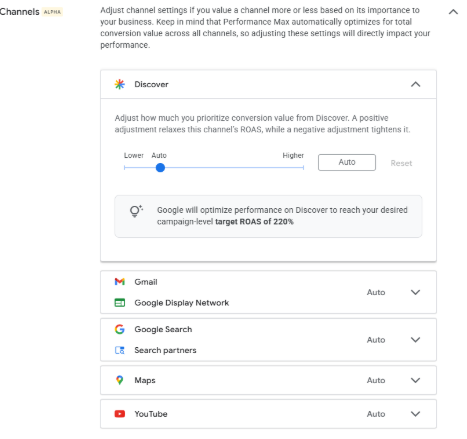
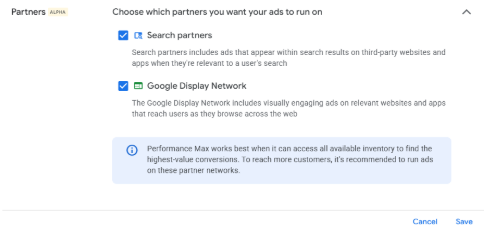
Choose in PMax whether to appear on Google Ads Partners and Display
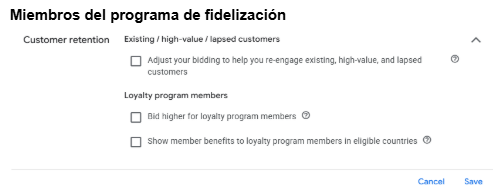
You can upload a list of active membership users to value those users higher or lower, depending on your business's specific needs. This can be combined with NCA (New Customer Acquisition).
Another campaign-level setting (in PMax) that allows you to choose which products you want to modify value rules for based on specific products, attributes, brands, or categories—without having to alter the product data in Merchant Center.
This is especially useful when, for example, you have private-label products where your profit margin is much higher than that of other brands you sell. It's also ideal if you want to clear out inventory and prioritize certain products.
The products you select are based on your Merchant Center data (labels, brands, categories, etc.).
Values can be set as a multiplier of that product's value, ranging from 0.5 to 10.
Keep in mind that your campaign's ROAS will also be altered by these adjustments. To see the true conversion value rather than the one modified by these rules, you should look at the original conversion value KPI.
This feature brings Performance Max campaigns closer to classic Shopping campaigns (though it is not available at the asset group level).
This account-level adjustment can also be found in the "Account-level product value optimization settings" section under Conversions.

.svg)