


When using Performance Max (PMax) for eCommerce, it’s very common to see most of your budget going to products that don’t sell, while a small portion of products brings in most of your conversion value.
The most practical solution is to classify products by performance and split them into campaigns based on their ROAS. To do this properly, you need a labeling system in Merchant Center and a clear structure in Google Ads. With Dolnai, it’s very easy to implement this strategy.
When all products are in the same campaign, you’re essentially demanding the same ROAS from Google across the board. As a result, the algorithm tends to prioritize what it already knows will sell, leaving other products “half-supported.” Some SKUs with weak ROAS can absorb spend (especially if they get a lot of “curious” demand but low conversion).
By segmenting by ROAS, you create different campaigns and can set a different tROAS in each one depending on which products are included. Besides improving budget allocation, this helps you focus spend on the products that generate the highest profits.
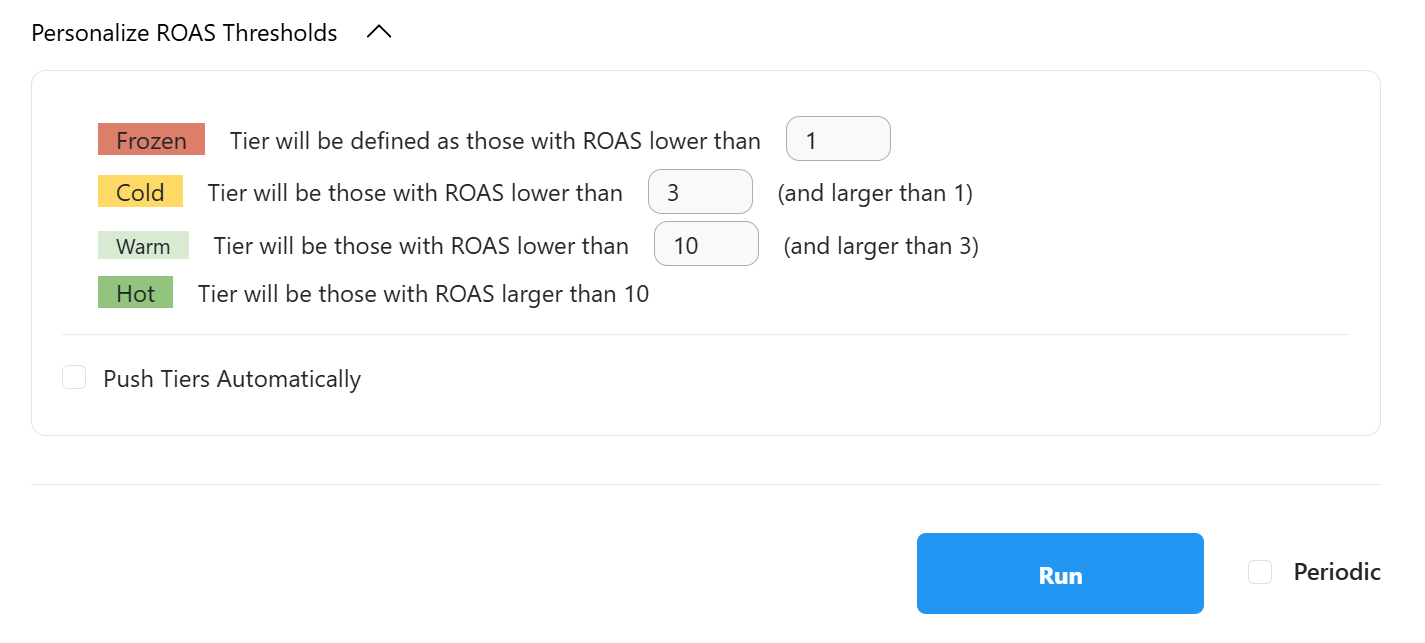
First, you need to choose the ROAS thresholds you want to use to separate products. When you create a Dolnai report, the default segments will be <1; 1–3; 3–10; and <10, but you can customize them for each account in the next section:
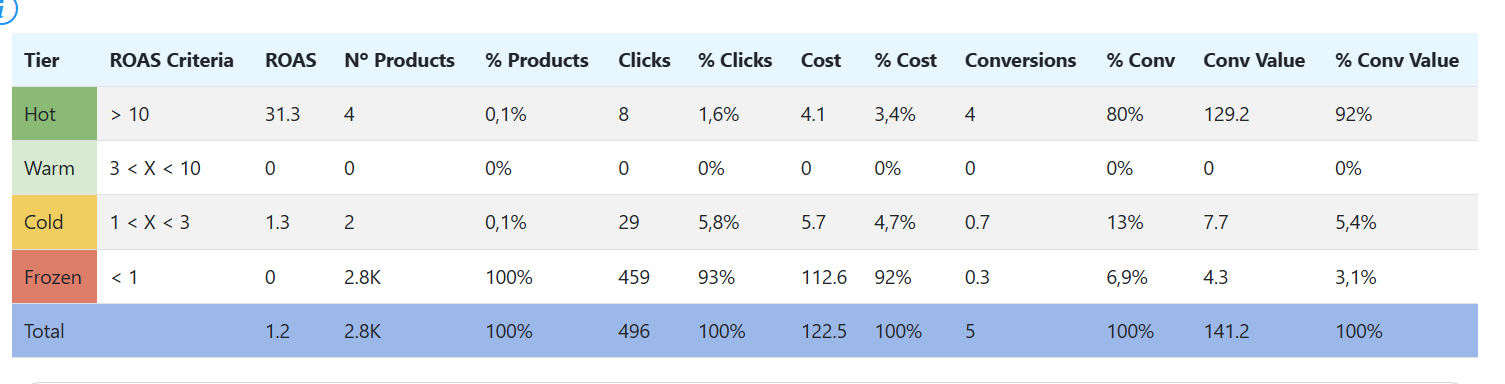
Once the report is created, in the Product Summary section you’ll see a table where you can check the distribution of products by label. In this case, the hot and warm products—only 4 items—bring 92% of the conversion value. Meanwhile, 92% of the cost has barely converted.
To apply the labels, go to the Product by ROAS section and click Push, following the steps in the document Push from Dolnai to Merchant Center.
Once the labels have been added, you should split the campaigns into several, depending on how many segments you want to differentiate—there don’t have to be 4 in every case.
The idea is to give Hot and Warm most of the budget and set a higher tROAS for that campaign. For Cold and Frozen, you could set a lower tROAS (2 or 3, for example) and allocate a small portion of the budget. In PMax, you can control which products enter by using listing groups (feed attribute filters, like custom labels).
After making the changes, you should keep updating the labels as the account evolves. Depending on the business and budget, and whether there’s seasonality, you’ll need to decide what time period to use for the first push and for subsequent ones—longer periods (1 year) or shorter ones. The key is that the period must be representative.
There are other strategies as well, such as moving products where you want more control into Standard Shopping campaigns, stopping Frozen products from showing, etc. It depends on each case and the state of the business.
If, in the original campaign, products are separated by asset groups (based on brand, product type, category, etc.), you should keep that same logic in the new sub-campaigns.

.svg)