Google Ads Search recommendations that destroy your ROI
Cristina Jiménez Gómez
October 19, 2026
•
5 min read
Google Ads recommendations are driven by algorithms designed to increase account spend or automatically broaden reach. Even though dismissing them lowers your Google Optimization Score, rejecting certain suggestions is crucial to protecting your budget and return on ad spend (ROAS).
Critical Recommendations to Reject or Avoid
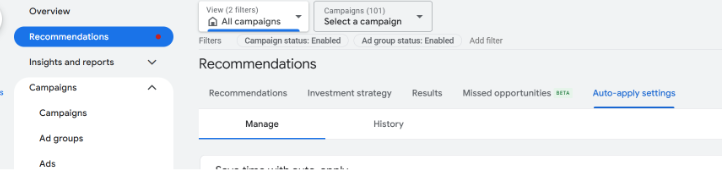
1. Auto-apply Recommendations
Why to decline: It allows AI to implement changes without prior human review—modifying budgets, keywords, or bidding strategies with zero notice.
Recommendations are usually generic and rarely fit every account, which is why turning off Auto-apply is strongly advised.
In my experience managing accounts, I've seen Google remove a campaign's most profitable exact match keywords or blindly enable Smart Bidding, Search Partners, and Display Expansion. The biggest issue is that you won't notice these changes unless you check the Change History, leaving you wondering why performance suddenly dropped.
Turn Off Auto-apply settings in Google Ads
2. Adding Broad Match Keywords
Why to decline: Google often suggests switching keywords to Broad Match to boost traffic. This typically pulls in irrelevant search queries that burn through budget without generating quality conversions.
This is especially risky if your budget is tight, the campaign is brand new, or your keywords are prone to triggering off-topic search terms.
3. Expanding Reach with Search Partners and the Display Network
Why to decline: Enabling the Display Network inside Search campaigns mixes low-intent traffic with active search queries. This inflates cheap, low-value clicks and muddies your metrics.
4. Changing Bidding Strategies (e.g., Maximize Conversions or Target CPA)
Why to decline: If your account doesn't track enough monthly conversions (ideally at least 30 to 50 over the last 30 days), switching to automated bidding forces the algorithm to make decisions on insufficient data, driving up your cost per acquisition (CPA). In these cases, stick to Maximize Clicks or Target Impression Share.
5. Increasing or Adjusting Daily Budgets
Why to decline: Google evaluates demand to recommend budget increases. If your business goals or financial caps don't support it, accepting will only raise your spend without guaranteeing a proportional return.
If you're running a special promotion where you need to adjust bids or raise budgets, use a Seasonality Adjustment instead so you don't confuse the algorithm.
We also need to be realistic about expectations relative to budget. I often see small, fragmented campaigns running on $5/day that would perform much better consolidated, giving the algorithm enough data to capture higher-quality clicks.
While Google encourages raising spend, you can estimate your daily clicks by dividing your daily budget by your CPC. To estimate conversions, multiply expected clicks by your conversion rate. The more data you gather, the more accurate your projections will be.
6. Enabling Campaign Broad Match / AI Features Without Prerequisites
Why to decline: If you aren't getting good results with Broad Match and lack an updated, easily crawlable website, you risk serving irrelevant or misleading ads that draw in poor-quality traffic.
7. Failing to Prioritize High-Performing Hours and Locations
Why to decline: Advertisers often attempt to target overly broad geographic regions 24/7. This prevents you from reallocating budget toward the specific areas and time slots that actually deliver the best performance.




.svg)