


Get a Free Google Ads Audit?
Claim my Free Audit!

SEM Management

Updated on
➡️
April 15, 2025

Disable Google's Asset Automation

Author:
 
Cristina Jiménez

Step-by-Step Guide to Disable Google's Asset Automation

Follow this guide if you want to turn off the option that allows Google Ads to create new assets for you in performance max campaigns. It is a good idea to turn them off if they haven't been delivering good performance.

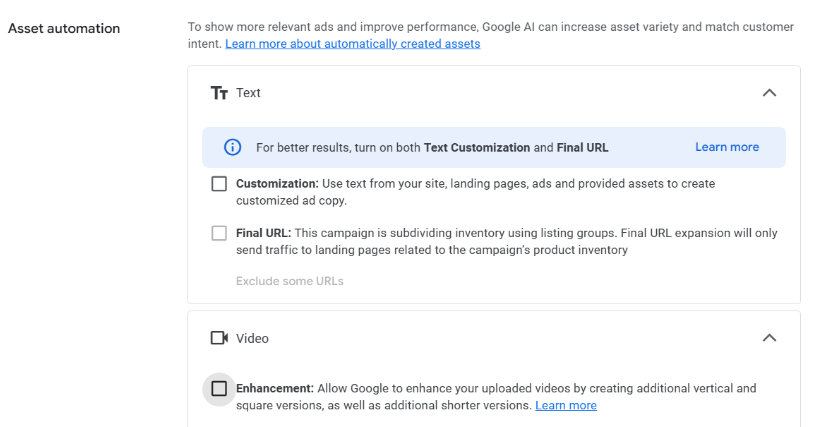
  1. Open your Google Ads account.
  2. Go to each of your active Performance Max campaigns.
  3. Open Campaign Settings > Asset Automation.
  4. Turn off the option
Campaign Type: Performance Max
Click Save


Make sure that your asset groups and campaigns have enough high-quality assets to attract potential customers, and continue optimizing from there.

Cristina Jiménez
Updated on_
April 15, 2025
Free TrialRequest Demo

*(No credit card required)

Other posts from our blog:

Dolnai Technology logo
Contact: dolnai@dolnai.com       
Dolnai is a certified Google Premier Partner
"The company has participated in the INVESTIGO PROGRAM, promoting the hiring of young job seekers to carry out research and innovation initiatives, within the framework of the Recovery, Transformation and Resilience Plan. This program is funded by the European Union – Next Generation EU."
© Dolnai 2025. All rights reserved.